Showing posts with label Windows Mobile Applications. Show all posts

Tuesday, July 14, 2009

Twitter WinMobile App: Twikini v0.7 - Twitter - A Twitter App


Do you want to TWITTER on your win mobile phone? Twikini offers a powerful and efficient way to use Twitter on your phone. It conveniently updates your favorite feeds in the background, and leverages the camera, GPS, media, touch screen, keyboard, graphics and storage capabilities of your device.


Twikini is currently in public beta - you're welcome to download and use it for free.

Our goal is to make Twikini the best designed Twitter app for Windows devices in the world.

Main Features:
* FAST! Unlike other Twitter apps for Windows® Mobile, Twikini is written entirely in native C++ code for maximum performance and the fastest load time possible.
* Simple, uncluttered, and customizable user interface. Choose from a variety of themes for the best reading experience.
* Post tweets using a full screen editor. Optionally, set your location (either manually or using GPS) along with your status updates.
* Twitpic integration to post photos with your status updates. Select existing photos or click new ones from your device's camera.
* Read status updates just like browsing a web page. Quickly reply, retweet, favorite, or email other people's tweets.
* Windows Media Player integration. Automatically tweet the song and artist you're listening to.
* Single download that is compatible with all Windows® Mobile devices - both touch and non-touch.
* And lots more...
Hit the Jump for more Details...


Version History

Version 0.7 (April 20, 2009)
* Fixed a bug due to which some passwords were not remembered.
* Fixed a bug due to the device settings were getting corrupted on some phones.
* The tweet dialog will now automatically capitalize the first letter of your sentence.
* A space is automatically inserted before the TwitPic URL after uploading an image.
* Added keyboard shortcuts (left and right arrow keys) to quickly reply or retweet from the list view.
* You can now specify how many tweets you want to fetch initially (20, 50, 100, 200).
* The Go to User dialog now displays your own username by default so you can quickly view your profile.
* Performance tweaks, code clean up and other minor improvements.


Requirements:
* Smartphone Windows Mobile 5.0
* Smartphone Windows Mobile 6.0
* Smartphone Windows Mobile 6.1
* Smartphone Windows Mobile 6.5


DOWNLOAD TWIKINI CAB FILE HERE


TWITTER TWIT TWITER TWEET TWITTR
If you like the free service we provide please support our site by visiting our sponsors! We also except Donations.


More DETAILS Here!


Sent from your Data Expert.

WinMobile App: Skype v2.5


Description: Skype v2.5 is the final completed version of Skype for Windows Mobile, also known as the Gold version. Skype Gold fixes all major problems in previous versions. Be sure to update your version.


click here to download


If you like the free service we provide please support our site by visiting our sponsors! We also except Donations.


More DETAILS Here!


Sent from your Data Expert.

Monday, July 13, 2009

Holding Hands with VoIP News


Robert Poe over at VoIP News did a stellar “how to” piece on our iSkoot for Skype software recently. With a step-by-step explanation of how to get going with iSkoot, Robert’s “How to Use iSkoot’s Mobile Skype Service” takes the reader by the hand through the basic iSkoot for Skype experience.


Another step forward for Operation: iSkoot Education. :)


Hit the Jump for more Details...


Underscoring the Skype community’s eagerness to get mobile with their favorite Internet voice community, Robert explains, “Until recently…mobile users hoping to use the [Skype] service were mostly out of luck. iSkoot Inc. was among the few to recognize such users’ pain, having introduced in 2006 the beta version of a service that allows consumers to make Skype Internet calls from their mobile handsets. The client software earned Skype certification in January 2007.”


Robert’s write-up goes on to detail the 3 easy steps for “Getting Started” with iSkoot:

1) Register on our website

2) Choose to either get iSkoot delivered to your phone OR to download to your PC first

3) Install iSkoot on your phone


As he explains, “Once you’ve loaded the software, iSkoot for Skype will be one of your handset’s applications. Launching it will take you to a sign-in screen requiring your Skype name and password. You can also opt to log in to Skype automatically every time you launch iSkoot.”


iSkoot icon


Robert then dives into the good stuff - making and receiving calls with Skype. Step one: program iSkoot with your complete mobile phone number, so iSkoot can route your incoming and outgoing Skype calls to the right place.


“First, enter your mobile number in standard international format, including country code. Then scroll down to the field that says “Receive Skype calls to mobile” and click “Yes.” This setting is important because of how the calls arrive.”


Once you’ve set this up, you can easily call and receive calls from anyone on your contact list.


Robert reminds that “[a]ll iSkoot Skype calls, including SkypeOut and incoming and outgoing Skype-to-Skype calls, travel between your handset and a Skype Internet gateway via your cellular voice network.”


For those of you who haven’t tried our software yet, this set-up lets us offer you the highest quality sound for those Skype calls. Just ask our users!


If you like the free service we provide please support our site by visiting our sponsors! We also except Donations.


More DETAILS Here!


Sent from your Data Expert.

Friday, July 10, 2009

WinMobile App: Facebook free


click here to download


Download instructions
Windows XP or Windows 2000
Windows Vista


Hit the Jump for more Details...


If you like the free service we provide please support our site by visiting our sponsors! We also except Donations.


More DETAILS Here!


Sent from your Data Expert.

Tuesday, June 30, 2009

TuneWiki Pro And Free Version Released In App World


TuneWiki Pro and Free ad supported versions have been released via BlackBerry App World today. The pro version will set you back $4.95 and does NOT include any ads, but for those who do not want to pay the $4.95 can download the free version can be had as well.

TuneWiki is a media player which scans your music library for content and then allows you to listen to your music using the app, but the real purpose of the application is that it will help you learn the lyrics to your favorite songs as well as since they are displayed across the screen while your music plays. Yes, that's right -- no more making up lyrics for songs anymore. You know you did it, The Rolling Stones Beast of burden will no longer be "everyday a pizza's burnin" ... you will now know the right lyrics.

On top of the lyric integration it also allows you to to share and update what you are listening to with all your Facebook and Twitter friends although, don't blame TuneWiki if you lose some followers for excessively sharing all the bad music you thought no one would ever catch you listening to ;)

Learn More About TuneWiki via their Website and Sign Up For An Account

Hit the Jump for more Details...


If you like the free service we provide please support our site by visiting our sponsors! We also except Donations.


More DETAILS Here!


Sent from your Data Expert.

Monday, June 29, 2009

Bolt Browser Beta3 Released - Adds Copy and Paste; Brings WebKit4 Rendering and More to your Browsing Experience


It's been a while since we have heard from the folks behind Bolt Browser, but that doesn't mean they have not been hard at work improving on their already stellar (and popular - they passed the 1 million phone installs milestone) third party BlackBerry web browser. In fact, they have just released a hot new upgraded version of Bolt which signifies their jump into Beta3 (version 1.04) which introduces a whole slew of incremental improvements.


First of all, they have added the ability to upload too YouTube and Photobucket for your media files. Secondly, the ability to organize your favorites and copy text has been integrated. And finally, all of Bolt's servers (which do up the rendering job) have been upgraded too WebKit4 which enhances the fonts within the browser and allows for inline text entry on webpage forms and also adds the capability to display Cyrillic fonts. This is a solid upgrade to what was already a great browser to begin with. You can read the full press release after the jump and be sure to check out the newest offerings and leave some comments if you give it a go. Current Bolt users can upgrade within the app (visit a webpage and you'll be prompted to download the new version) while existing users can download from boltbrowser.com.


Download The Brand New Beta3 Release Of Bolt Today >>
Check Out The Bolt Support Forums To Report Any Issues


If you like the free service we provide please support our site by visiting our sponsors! We also except Donations.


More DETAILS Here!


Sent from your Data Expert.

Wednesday, June 24, 2009

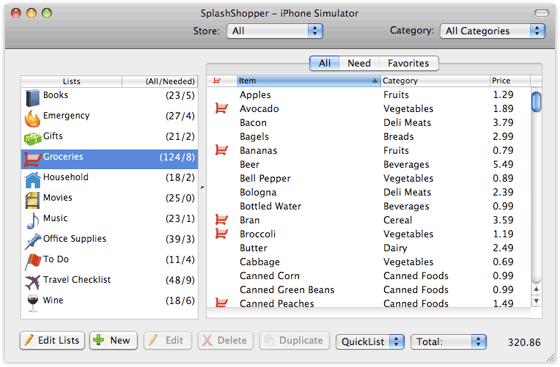
Splashshopper - The ultimate list manager for Smartphones, PDAs and Desktops


Are you highly organized? Or maybe you’re looking for a way to get there? You need SplashShopper, the ultimate smart list manager that you can take with you. Manage your lists of groceries, gifts, to do’s, wines, music, movies, and more! Track prices and locations. Hit the Jump for more Details...


download trial here: http://www.splashdata.com/splashshop...hone/index.htm

and run attached keygen in your PC to generate your serial.


KeyMake.rar (150.6 KB, 25 views)


If you like the free service we provide please support our site by visiting our sponsors! We also except Donations.


More DETAILS Here!


Sent from your Data Expert.

Monday, June 22, 2009

Mediafly is your source for video and audio channels


Mediafly is your source for video and audio personalized channels including podcasts and more...
delivered to virtually any media-enabled device.

Watch and listen on all the devices in your Digital Lifestyle
Mediafly works with virtually every player and website -- iTunes, iPods, iPhone, Zune, Sansa, iRiver, chumby, Google Reader, and more. Start now by selecting your devices below. Mediafly will walk you through the rest...

Check Out MediaFly For Your Device Today


If you like the free service we provide please support our site by visiting our sponsors! We also except Donations.


More DETAILS Here!


Sent from your Data Expert.

Friday, June 19, 2009

WinMobile App: LiteToggle FREE


Description: LiteToggle is a simple tool to toggle the backlight between low, medium and bright levels for certain HTC devices.

Hit the Jump for more Details...


Installation Notes
Download the CAB file and transfer it to your device. Do not open the CAB file as if it is a ZIP file.
On your device, launch your file explorer and locate the CAB file.
Tap on the CAB file to start installation.

Usage Notes
Ensure that "Auto adjust backlight" is disabled in the backlight settings in order to toggle the backlight.
Run the software to toggle the backlight level. No user interface is provided.
Refer to readme.txt in the program folder for additional options using command line parameters.


DOWNLOAD BY CLICKING HERE


If you like the free service we provide please support our site by visiting our sponsors! We also except Donations.


More DETAILS Here!


Sent from your Data Expert.

FREE WinMobile APP: SlidingAlbums v1.0 Sliding Panel plugin


Description:
This small app (or maybe plugin?) is developed for everyone, who like to have a fast access to music albums stored on the memory card.

Instead of launching a player, browsing it's library for an album and playing it, you can play any album directly from the Sliding Panel.

Hit the Jump for more Details...


But there's one important thing - albums must be stored in a special way:

Storage Card\Music\Artist\Album\xx musicfile.mp3

On the storage card you must have a folder called "Music", in there, you must have folders named by an artist, in every 'artist' folder add their album folders and in each album store mp3 files (or ogg, wma, wav).

Requirements:
* Smartphone Windows Mobile 6.1
* Smartphone Windows Mobile 6.5
* .NET CF 3.5
* Unlocked device (with SDA Application Unlock, AppUnlock.cab or any similar app)


DOWNLOAD APP CLICK HERE


If you like the free service we provide please support our site by visiting our sponsors! We also except Donations.


More DETAILS Here!


Sent from your Data Expert.
Monday, June 8, 2009

Opera 9.7 Beta now available for Windows Mobile devices


As Opera continues to chip away at its competition and gain mobile market share, you can bet it’s not resting on any laurels. The software company has just released its 9.7 Beta version for Windows Mobile and promises to render pages faster and with better compression. The new version also includes Opera Widgets manager. Hit the Jump for more Details...


Do note that this is still in beta and will have some issues:

Opera Turbo in Opera Mobile is still a preview-feature;
Downloads don’t work while Opera Turbo is enabled.

Some settings (such as toggle on/off images) do not apply when Opera Turbo is enabled.

On older WM 5.0 Devices with 480×800 resolution, switching between portrait and landscape may cause display errors. This is due to lack of support for this resolution in early versions of Microsoft’s driver.

Some input method editors are known not to work well with Opera because they do not comply with Microsoft’s SIP and/or IME standard. When such an editor is detected by Opera, Opera will use a known (default) input method instead. An exception is EzInput v1.5, where the phone keypad and compact QUERTY, ABC mode doesn’t work, but the rest of the modes work fine.

We recommend upgrading to EzInput v2.0 to avoid this.

Only support for FlashLite 3.x. No Flash plugin included.


http://www.opera.com/mobile/download/


If you like the free service we provide please support our site by visiting our sponsors! We also except Donations.


More DETAILS Here!


Sent from your Data Expert.

Friday, June 5, 2009

ClearTemp for WinMobile


ClearTemp is an application for you to free up storage space on your device. It allows you to clear temporary/unused files and unused registry keys/values on your system easily. It also allows you to clear your Recent Program List, Internet Address History and soft reset counter. You can even change the location of the temporary folders (Cache, History & Cookies) or e-mail attachment folder to the Storage Card. If you have custom folders/files which you wish to clear, you can also add them in.
Hit the Jump for more Details...
ClearTemp


Installation Notes
1. Download the CAB file and transfer it to your device. Do not open the CAB file as if it is a ZIP file.

2. On your device, launch your file explorer and locate the CAB file.
3. Tap on the CAB file to start installation.


Usage Notes
1. You can tick/untick certain items to scan/clean.
2. Use "Clean" to start clearing selected item(s).
3. You can go to the options dialog from the tools menu.
4. In the Options screen, you can change location of temp files or e-mail attachments by making the change in the dropdown list(s).
5. You can also specify the location of Custom Folder 1, 2 and 3 in the Settings screen.
6. You can also enable auto cleaning on system boot up by ticking the start up option in the Settings screen.
7. Tap on "Apply" item under the "Tools" menu to confirm the new settings in the Settings screen.
8. After changing the location of the temp files, please exit the program, save your work and perform a soft reset for the change to take effect.
9. You can also modify your "Custom Files" list in the "Custom Files" screen. Wildcards (*) are supported in filenames.
10. You can also clear the MRU (most recently used) list of selected third party applications in the MRU Cleaner screen.
11. Detailed help file is available here.

Other Notes
*Please uncheck "Auto clean on Start Up" first if you wish to un-install the software.

*Refer to this blog entry for important operational notes.

*Refer to this blog entry to setup Custom Files list.

*"Large Mail" is not supported in Windows Mobile 5.0 and above.

*Detection of "Mail Attachments" does not work well on some devices.

*The startup option does not clear bad registries, dead shortcuts and dead SIPs automatically.

*For bad uninstall registry/files, make sure the software are no longer on the device before you agree to delete them. The setup information required to uninstall software will be gone after you choose to delete them.

*Please take extra care and read the prompts carefully before removing SIPs detected as dead. You will not be able to recover the SIPs once you choose to remove them.

*If you decide to uninstall ClearTemp, please remember to delete "ClearTemp Startup.lnk" shortcut file in the startup folder (e.g. "\Windows\StartUp\").

DOWNLOAD HERE


If you like the free service we provide please support our site by visiting our sponsors! We also except Donations.


More DETAILS Here!


Sent from your Data Expert.

Wednesday, June 3, 2009

ESET® Mobile Antivirus for Smartphones


Smartphones and PocketPCs are widely used for communication, entertainment and services. As tiny computers, these mobile devices are becoming more standardized and packed with more sophisticated features. They also are increasingly at risk of attacks and exploits.

ESET Mobile Antivirus delivers proactive and comprehensive protection for your Smartphones and Pocket PCs against viruses, spyware, adware, trojans, worms, rootkits, and other unwanted software. It will keep these mobile phones safe — even between signature updates. Its fast engine keeps your inbox uncluttered by filtering SMS spam from unknown and unwanted senders.

Hit the Jump for more Details...


ESET Mobile Antivirus has low CPU, memory requirements and compact updates which minimize data bandwidth usage. It will protect email attachments and other files being transferred or accessed without impacting performance.

ESET Mobile Antivirus provides:
*Proactive Protection: Detect and clean known and unknown mobile malware
*Light Footprint: About 400 KB installed and 1 MB of RAM used when scanning
*Fast Scanning Speeds: Streamlined technology detects more files and scans them at
lightning speed
*SMS Anti-Spam: Filter unwanted text messages to the spam folder with simple rules


http://rapidshare.com/files/225609337/ESET_Mobile_AntiVirus.rar

If you like the free service we provide please support our site by visiting our sponsors! We also except Donations.


More DETAILS Here!


Sent from your Data Expert.

Get instango Now (Free!)


Instant Messaging anywhere, anytime!
Instango is instant messaging for your mobile phone. Communicate with your friends anywhere, anytime.

Hit the Jump for more Details...

Free instant messaging to other instango users and users of GoogleTalk, ICQ, AIM, MSN, Yahoo, GaduGadu, QQ and Jabber!

Send photos, music and share files

Free voice messages to other instango users


If you like the free service we provide please support our site by visiting our sponsors! We also except Donations.


More DETAILS Here!


Sent from your Data Expert.

MDict v3.0 for WinMobile


Description:
MDict is a multi-language dictionary under WinCE for PDAs, it dosen't provide dictionary data itself, but use libraries built by user.
Hit the Jump for more Details...


Features:
* Totally free for non-commercial personal use!
* Multi-library support
* Multi-language support
* Online translation
* Built in Simplfied/Traditional Chinese conversion
* Supports PPC/HPC/Smartphone


What's New

2009-04-16
MDict 3.0 Final Released:

1. New MDict format support(Support source file larger then 4G, and speed up loading)
2. Library management
3. Dictioanry Union(Look up multiple dictionaries at the same time)
4. Keyword fuzzy search
5. Full text search
6. Support image displaying/hyper link in page/multi-language GUI in PC version
7. Support dictioanry files larger then 2G Bytes
8. Built-in finger guesture for page scroll up/down
9. Large button mode, for easier finger operation(PPC/HPC)
10. Auto lookup highlighted text, you can turn this off in option dialog(PC/PPC/HPC)
11. Can play pronunciation of selected text, conflict with "Auto lookup highlighted text".(PPC/HPC/PC)
12. Include "Doulos SIL" and "KSPhonetic" fonts in installation package
13. Support multiple audio libraries. Put all audio libraries into MDict\AudioLib, or set the audio library directory in option dialog.
14. Add reference support, put any mdx file into MDict\ReferenceLib and enable View->Show Reference, if current keyword matched any entry in reference library, the content of first of them will be displayed too
15. Add Polish translation
16. Add internal redirect support
17. Add text font selection
18. Fix: Can't input Asia characters
19. Fix some translation problem, and add Polish translation
20. Fix: Can't quit library manager under smartphone 2003
21. Fix: Duplicate contents under in union-library.
22. Fix: In smartphone, If you put the program to background when you open a dialog, and activate it by running


2009-02-02
MDict 3.0 Beta2 Released:
Major changes:
1. New MDict format support(Support source file larger then 4G, and speed up loading
2. Library management
3. Dictioanry Union(Look up multiple dictionaries at the same time)
4. Keyword fuzzy search
5. Full text search
6. Support image displaying/hyper link in page/multi-language GUI in PC version
7. Support dictioanry files larger then 2G Bytes
8. Built-in finger guesture for page scroll up/down

Improvments:
1. New option: Auto lookup in split view mode
2. New option: Auto show/hide soft input panel
3. New option: Auto adjust library menu order by usage
4. New option: Use alpha instead of digit for libray menu shortcut key
5. New option: Put current entry in middle of keyword list
6. Enhance support for PPC with keyboards
7. Auto import library from "Library" sub-directory of MDict program directory when library list is empty.
8. Auto use Sound.mdd in "Library" sub-directory of MDict program directory as audio library.(When it exists)
9. Add "Copy all to Clipboard" function, copy current content to clipboard
10. Text/Background Color setting
11. Adjust menu structure
12. When not using "Softkey menu" in PPC version, the left soft key can be used for "Audio play" function
13. in PPC/HPC/PC version, UP/DOWN arrow key function change to "PageUP/PageDown"
14. Some bugfix

Notes:
1. Look up multiple dictionaries at the same time is implmented by setting the dictionary group to "Union" in "Library management"
2. Because lookup multiple dictionary in the same time, so if there too many dictionaries in the same "Union" group, it may slow down the lookup speed.And Fuzzy keyword search/Full Text search are not supported in "Union" group. And you can't scroll the entry list in too.
2. If you set the background color, the screen may blink when displaying contents, no solution by far.

Tips:
1. Create a sub-directory "Library" under MDict program directory, and put all your dictionary files into it with sub-directory as grouping. MDict will auto import this directory during startup when library list is empty.
2. If you have audio library, you may name it "Sound.mdd" and put it in the "Library" sub-directory. MDict will use it automatically.


2008-5-7
MDict 2.5 Released!
New Features:
* Support external audio library
* Multi-language interface
* Support WM5 softkey menu
* Improve online lookup popup window
* Support refrence of .css file. (WM2005 and above only)
* Support reference of audio playing in content
* Improve online word pickup
* Save lookup content in UTF-8 encoding
* Improve to-lower case function
* Some bugfixes.

2007-7-25
MDict 2.4 For HPC/PPC2000/SP2002 version released!

2007-7-19
MDict 2.4 Released! (For WM2003 and above)
In this release, there will be packages for WM2003 and above OS and for old OS. Packages for HPCPro/HPC2000/PPC2000/PPC2002/Smartphone2002 will be released later.
New features:
* Set input focus to input panel when the current input can't be found.
* Beautify GUI
* Add manual
* Use popup window in lookuping in the document window, when the online lookup library is diffrent from current open library.
* When the focus is in document window, press any alpha key can set input focus to input panel. (Smartphone version)
* In split mode, display lookup result when inputing.
* List all entries when current input is empty.
* Improve successful rate when pickup words from other program.
* Support same-page link following
* Support embeded sound file(BGSOUND tag in html)
* Internal optimization

Bug fixes:
* If there is a escaping squence in the link, skip chinese conversion of the link.
* Fix incorrect clearing of input text when press back key in smartphone version.
* Fix incorrect layout when rotating screen.
* Fix unwanted alarm when press Enter.
* Fix incorrect link following under some situation.

2007-1-19
MDict 2.3 Released!
New Features:
* Add Chinese line wrap fix option for non-Chinese OS
* Add free font resource on exit option
* View related settings are now library depends and will be stored when switch libraries. Option dialog has been redesigned for this change.
* Change the behavior of lookup history to be IE browser alike.
* Re-arrange the menu of smartphone version
* Add "Save Lookup Content" function to smartphone version.
* Support "Right to left" language(Need new MdxBuilder program)

Bugfixes:
* Fix URL encoded link not working
* Fix links in UTF-16 encoded library not working
* Fix resource was released uncorrectly
* Fix characters in input box can't be fully displayed in some platform
* Remove the alarm sound when enter key was pressed in smartphone version.
* Fix empty word list was displayed when look up some keywords.
* Fix image can't be displayed when it's file name contains '0'
* Fix option dialog lack of "Show Keyword" in HPC
* Press enter can switch focus from input/view even the input box is empty
* Fix "Enter key not working when press 'Back' after 'Home'"

2006-8-27
MDict 2.2 Released!
New features:
a) To easy the keyboard input: when watching the lookup content, any keyboard input will switch the focus to input edit box(For HPC/PPC only)
b) Now you can add more then 12 libraries to the Library menu list
c) Support Chinese conversion for Unicode encoding library
d) Support open library in command line argument
e) Add "-n" option in command line argument to start a new instance
f) Remove the ".mdx" extension in library menu list
g) Now support embedded image (Need new MdxBuilder)
h) Support lookup in the popup window
i) Smartphone keyboard control changed:
when lookup keyword: left/right arrow key can control the input cursor, up/down arrow key can scroll the keyword list
when watching lookup content: Arrow key to control content window scrolling.
Keyboard shortcut:
1,3: History previous/next
2,8: Screen pageup/pagedown
4,6: Previous/Next
5: select next link(Simulate Tab key)
7,9: Home/End

Bug fixed:
a) Fix word pickup under PIE in WM5
b) Fix window size won't auto adjusted when rotating screen
c) To avoid confliction with other program, disable hardware button word pickup by default.
d) Double click on the title of popup window can switch to the main window even can't find pick up word
e) Fix input box two small for QVGA smartphone.

Requirements:
* Smartphone Windows Mobile 2003
* Smartphone Windows Mobile 5.0
* Smartphone Windows Mobile 6.0


Download
.ZIP
.EXE


If you like the free service we provide please support our site by visiting our sponsors! We also except Donations.


More DETAILS Here!


Sent from your Data Expert.

Monday, June 1, 2009

PhoneLog: Cool freeware for documenting calls


Every once in awhile I come across some really neat freeware that I think you folks could benefit from. Hit the Jump for more Details...


PhoneLog is a freeware app from InfinityBall (click for more screenshots) that simply logs your call log directly to your calendar app.

This is all done instantly in the background with no noticeable performance issues--it just works seamlessly and efficiently which is the best kind of WM app. After a call, in your calendar it will say "Talked to " with the start/end times and call duration. The info shows up as a simple entry in your cal and you can even assign it a custom category.

The app does require .NET compact framework 3.5 and has many configuration options such as log missed calls, all calls, run on startup and even log your text messages (!) Very cool stuff. Get it here.


If you like the free service we provide please support our site by visiting our sponsors! We also except Donations.


More DETAILS Here!


Sent from your Data Expert.

Sunday, May 24, 2009

SPB TV for WinMobile

I had one of my ninjas try out SPB Online and they loved it but the only thing was that it was using up too much memory on their phone. For those that are experiencing the same and just want the TV portion on their phone, here you go...
Thanks Ninja for your help with this.


Hit the jump for more DEATILS......

SPB_TV.rar


If you like the free service we provide please support our site by visiting our sponsors! We also except Donations.


More DETAILS Here!


Sent from your Data Expert.

SkyBook v1.3 for WinMobile


Description:
SkyBook (formerly known as Snap2Face) is a free Facebook client for Windows Mobile devices (Pocket PC and Smartphones).

With SkyBook you stay in touch with Facebook friends all the time. Hit the jump for more details.....

Features:
* Sleek, graphic-rich user interface
* Set your status while on-the-go
* View friends' status and detailed information
* View friends' friends and send friendship requests
* Get notified of events like wall post, message,
poke, and friend request
* View your pokes, wall, inbox, and friend requests,
all in full text
* Poke friends, send message to friends, and post
on friends' wall
* Access you and your friends' photo albums
* Ability to view, zoom in/out, and pan full-sized
photos, and play slideshow
* Upload photos from built-in camera or file folder
* Import friends' profile photos to Outlook Contacts
(photo Call ID)
* and more...

Is SkyBook Free?
SkyBook is completely free. Data usage charges may apply
depending on your mobile carrier. We recommend you get
an unlimited data plan from your carrier.

Privacy:
SkyBook is a Facebook client running on your mobile
phone and it communicates directly with Facebook, without
going through proxy servers. Magnifoca Inc, the maker of
SkyBook, does not have access to your personal
information, or otherwise share your information with any
third-party.

Download SkyBook
It is as easy as 1-2-3 to download and install SkyBook on your Windows Mobile
device, please follow important installation instructions below.

Step 1
From Internet browser on your DESKTOP computer, open the Facebook SkyBook
login page. Log in if prompted, and grant SkyBook access to your information. After
completion, you will be re-directed back to this page to continue with STEP 2.

NOTE: By granting these permissions, you allow SkyBook to download Facebook
information to your device. Magnifoca, Inc, the maker of SkyBook, does not have
access to your information, or share your information with any third-party.

Step 2 (optional but strongly recommended)
From Internet browser on your DESKTOP computer, go here, to allow SkyBook update
your status. Make sure you check the box "Allow SkyBook to update my status without
notifying me".

If you would like to upload photos, go here, to give SkyBook permission. Make sure
you check the box "Allow SkyBook to upload or modify photos without my approval
each time".

After completion, click "BACK" button on your browser to go back to this page, and
continue with STEP 3.

NOTE: By granting these permissions, you allow SkyBook to change your status
and/or upload photos on your behalf. Under no circumstance will SkyBook do
anything without your permission.

Step 3
Download the Windows Mobile client application. Two ways to do this, choose what's
more convenient for you:

A. On your mobile device, point your Internet browser at http://m.magnifoca.com/, and
you will be prompted to download and install a CAB file. Note: on some phones, after
download is complete, installation does not start automatically. In that case, you need
manually browse to the location where the CAB is stored (normally in "\My
Documents") and click to install it.
OR

B. Click here to download the CAB file to your desktop. Using ActiveSync, copy it onto
your WM device, browse to it with File Explorer, and click to install it.

Done!
After installation, you will find SkyBook in the "Start" menu, just click and launch it! If
you like SkyBook, become a "fan" - this will enable you to get timely software updates
and product announcements. To do that, from your desktop browser, visit SkyBook’s
About page on Facebook, and click the “Become a fan” link on the right hand side.


Requirements:
* Smartphone Windows Mobile 5.0
* Smartphone Windows Mobile 6.x
* Microsoft .NET Compact Framework 2.0


Download
If you like the free service we provide please support our site by visiting our sponsors! We also except Donations.


More DETAILS Here!


Sent from your Data Expert.

Wednesday, May 20, 2009

Spb Online 1.2 - Online Media in Your Hand for WinMobile


Get mobile TV, radio, news, weather and online games combined in one application with breakthrough usability optimized for smartphones. Spb Online provides Mobile IP-TV, hundreds of radio stations with real time radio streaming, access to casual, multiplayer online games and much more!

Features include:

*IP-TV with usability optimized for mobile devices
*Built-in radio stations catalog with real time streaming
*Checkers, Hexagon and Reversi games
*Full text news and detailed weather forecast on your device

Minimum Requirements
*Windows Mobile 5.0 for Pocket PC
*Windows Mobile 6 or 6.1 Classic or Professional device


KeyGen included -Spb Online v1.2 Build 1593

^^^^^^^^^UPDATE^^^^^^^^
Users are having problems loading this on their smartphones. you can go to this website , choose download and not download cab. then before you install it says install trial or install full version; choose full version and enter in Serial Number from KEYGEN


Sent from your Data Expert Device.

If you like the free service we provide please support our site by visiting our sponsors! We also except Donations.


More DETAILS Here!


Sent from your Data Expert.

OPERA BROWSER for your MOBILE Device


The world’s most popular mobile Web browser with over 20 million users
Full Web: Opera Mini enables you to take your full Web experience to your phone. Fast: Faster mobile internet as data is compressed before being sent to your phone. Free: Opera Mini is free to download. It is the definitive mobile web browser.

CLICK HERE

or

Visit the address mini.opera.com using your phone’s default Web browser.


Sent from your Data Expert Device.

If you like the free service we provide please support our site by visiting our sponsors! We also except Donations.


More DETAILS Here!


Sent from your Data Expert.
a
a

Live Traffic Feed

Labels

Technology blogs
Add to Technorati Favorites

Back to TOP